Widgets
A days since widget for iPhone.
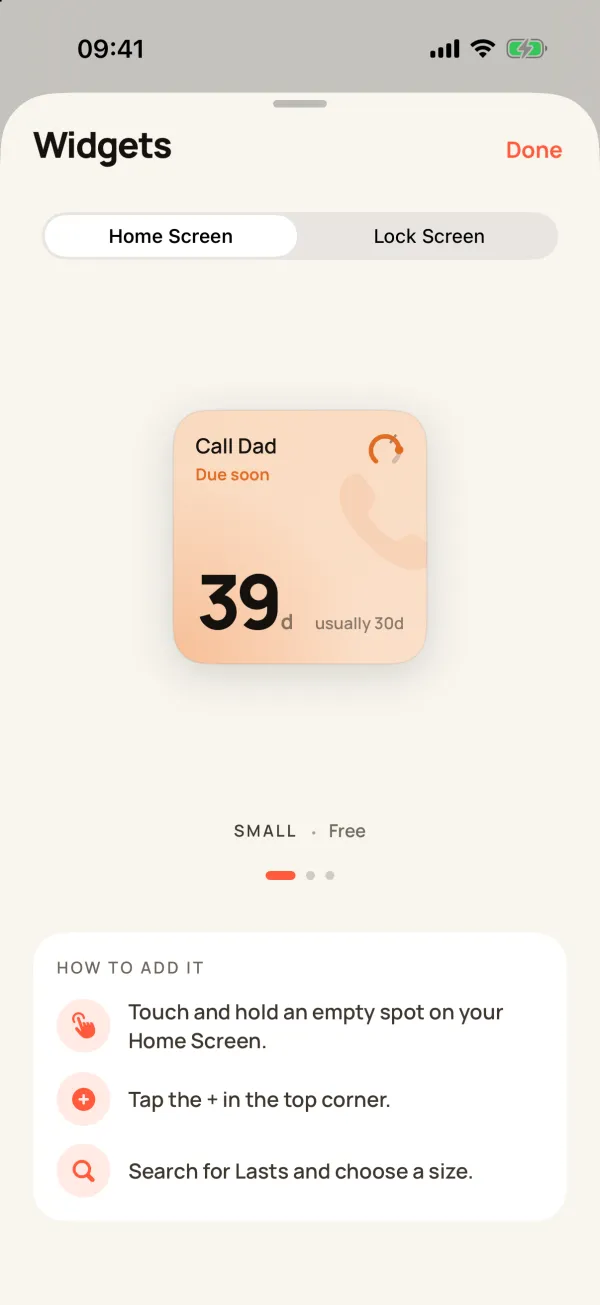
Keep the number where you'll see it, on the Home Screen or Lock Screen. The color warms as time passes.
Updated October 2026. Written by the maker of Lasts.
Why a widget
A days since number is most useful when you see it without trying. On the Home Screen it's there each time you unlock, and the color tells you whether it's time before you read a word.
The Lasts widgets
| Feature | What it shows | Free or Pro |
|---|---|---|
| Small | One thing and its number | Free |
| Medium | Three things | Pro |
| Large | Six things | Pro |
| Lock Screen | One thing, in circular, rectangular or inline styles | Pro |
You pick which things appear and in what order. The widgets follow the same green to coral warmth as the app, so a glance is enough.
How to add one
- Install Lasts and add a thing
Give it a name and say how often feels right.
- Touch and hold the Home Screen
Tap Edit, then Add Widget, and search for Lasts.
- Choose a size
Add it, then touch and hold the widget and choose Edit Widget to pick which thing it shows.
For the Lock Screen, touch and hold the Lock Screen, tap Customize, and add Lasts from the widget row.
Other options
Most of the apps in our roundup of days since apps have widgets too. Some put them behind a subscription; in Lasts the Small widget is free.
Questions
Is the Lasts widget free?
Yes, the Small Home Screen widget is free. Medium, Large and Lock Screen widgets come with Pro.
Can a widget show more than one thing?
Medium shows three things and Large shows six, in the order you choose.
Does the widget update on its own?
Yes. The count moves up each day and resets when you mark the thing done in the app.